Tour the dashboard
What you’ll find on your account’s home page and where each tool lives.
Updated October 22, 20261 min read
The dashboard is your private space on SLAZE. You land there after logging in, at slaze.cc/dashboard.
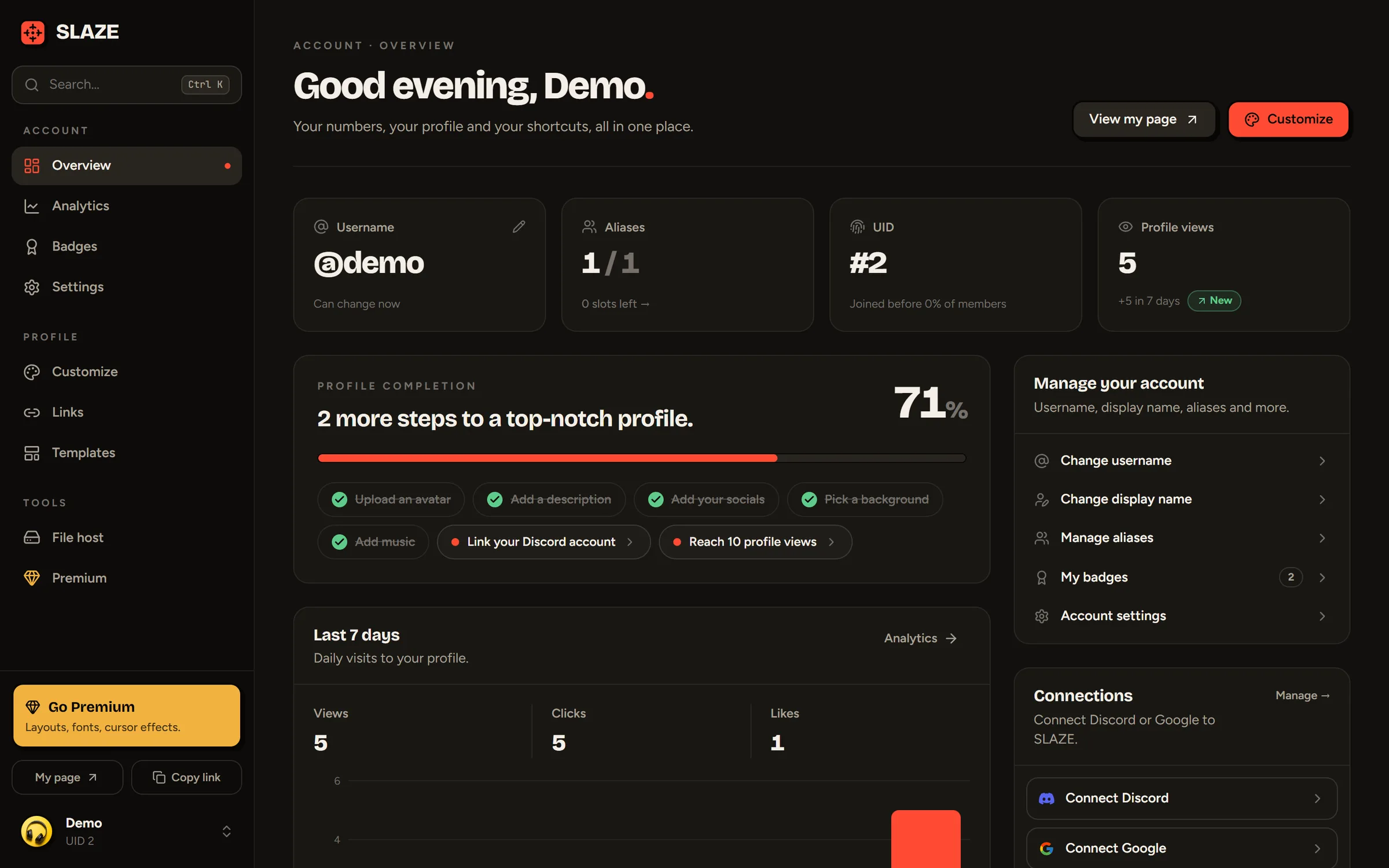
The menu
The menu on the left (the menu button on mobile) is split into three groups:
| Group | Pages |
|---|---|
| Account | Overview, Analytics, Badges, Settings |
| Profile | Customize, Links, Templates |
| Tools | File host, Premium |
At the bottom of the menu: My page opens your public profile, Copy link copies its address.
The Overview page
- Four cards: your username (and when you can change it), your aliases, your sign-up number (UID) and your profile views.
- Profile completion: a progress bar and the steps left (avatar, description, socials, background, music, Discord, 10 views). Click a step to go straight to the right place.
- Last 7 days: views, clicks and likes, with a link to the full stats.
- Manage your account: change your username or display name, manage aliases, see your badges, open the settings.
- Connections: link Discord or Google.
- Share: your link, a downloadable QR code and buttons to share it. See Share your profile.
- File host: the storage space you’re using.
Still stuck?
Email us and describe the problem: we’ll reply by email, in English or French.