Layout, fonts and colors
The 9 layouts, the fonts (and your own), the colors and the card style.
Updated October 22, 20262 min read
These settings are in Customize → Appearance.
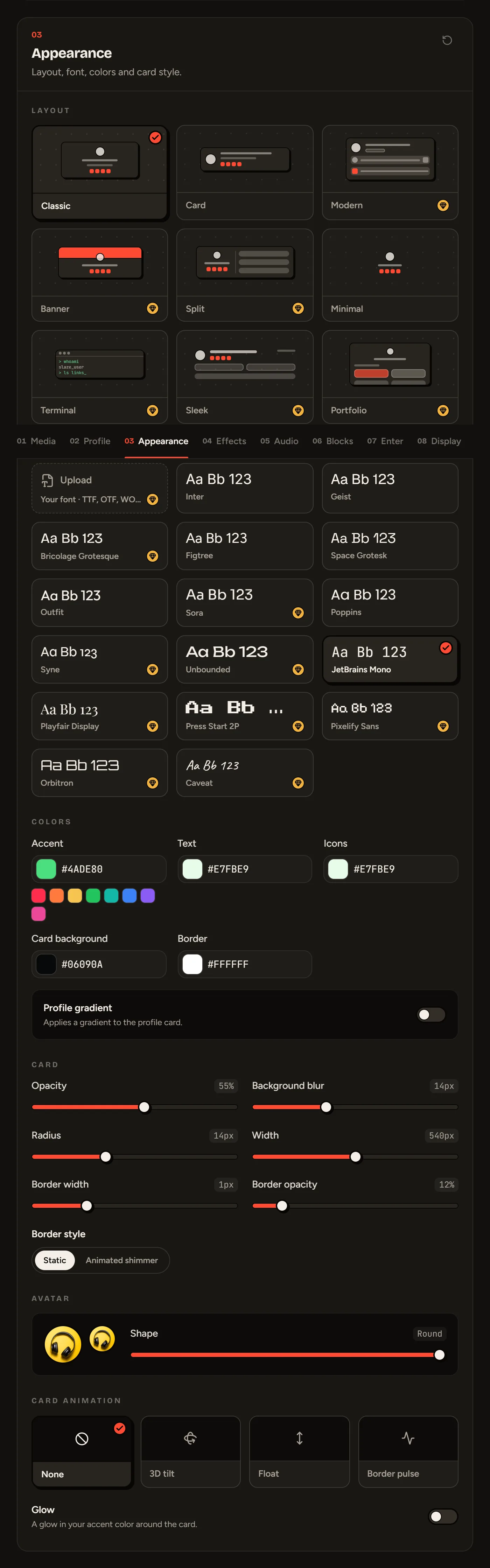
Layout
Hover over a layout to read its description.
| Layout | Style | Plan |
|---|---|---|
| Classic | Centered card, avatar on top, links below | Free |
| Card | Compact card, avatar on the left | Free |
| Minimal | No card, just you and your background | Free |
| Modern | Everything left-aligned, pill badges, wide Discord card | Premium |
| Banner | Big banner on top, avatar overlapping it | Premium |
| Split | Identity on the left, content on the right | Premium |
| Terminal | Your profile in a retro terminal window | Premium |
| Sleek | No card: big identity, stats top right | Premium |
| Portfolio | A real scrolling page, with project cards | Premium |
The Portfolio layout adds its own section to the editor: see The Portfolio layout.
Font
16 fonts, 7 of them free (Inter, Geist, Figtree, Space Grotesk, Outfit, Poppins, JetBrains Mono). The others (Bricolage Grotesque, Sora, Syne, Unbounded, Playfair Display, Press Start 2P, Pixelify Sans, Orbitron, Caveat) are Premium.
Colors
- Accent: the color of your highlighted elements.
- Text, Icons, Card background, Border.
- Profile gradient: applies a gradient (start, end, angle) to the card.
Card
Set the card’s opacity (0% = transparent), the background blur, the corner radius, the width, the border width and border opacity, and the border style (static or animated shimmer).
Avatar
The Shape slider goes from square (0) to round (50).
Card animation
None, 3D tilt (the card follows the mouse), Float or Border pulse. The Glow option adds a glow in your accent color around the card.
Still stuck?
Email us and describe the problem: we’ll reply by email, in English or French.